Are you an APEX enthusiast or just want to learn more?
Well, this is your chance! I have created a new APEX Meetup Group in Leeds. This will be the first of its kind in the UK and the first event has been planned for August 13th 6 - 9pm It will be held at the University of Leeds so keep the date free in your calendar and come join us. Tell your friends and your colleagues, all are welcome.
RSVP for the Event Now: http://www.meetup.com/orclapex-Leeds/events/191140412/
Join the Meetup Group Now: http://www.meetup.com/orclapex-Leeds/
So why have I decided to do this?
Well, anyone who knows me will know that I am a massive Geek and also that I live and breathe APEX. This is another way of getting involved in the APEX community and sharing knowledge and ideas with each other. It is the first time I have run this kind of event but with the meticulous planning and great people, both presenting and attending, I'm sure this will be a success! I want to emphasise that this event is not solely for those based in Leeds. Everybody is welcome, from near or afar!
Thank you
The next thing I want to say is a massive thank you to Anthony Rayner from Oracle for agreeing to come up and present and show us some of the great new features APEX 5.0 has to offer, as well as helping to plan the event and put it together.
More about the Event
We have left the arrival time open so you can come any time between 6 and 7, which will allow people to come either straight from work or a little later. It will also give time for anyone coming by train or further afield the chance to get to Leeds. Around half 6 we will be getting some pizzas for everyone and if you do come a little later we will have some left so don't worry. We will also have some refreshments for everyone.
Around 7 there will be a welcome talk outlining some of the plans for future events. This will be followed by the eagerly anticipated presentation from Anthony on APEX 5.0. We will then have a short break for refreshments.
We are then going to end with a Q&A Panel with some APEX Experts that are ready to answer any questions you throw at them so make sure you have some questions ready.
Spaces are limited so RSVP Now
After the event, we're going to be heading into town for a drink or two. Of course, all are welcome to join us.
If anyone has any questions, feel free to send me an email or post a comment and I will be happy to answer.
Tuesday 1 July 2014


Tuesday 15 April 2014
Just Gage
This is just a quick post, in one of my applications I needed a nice gage.
After viewing a few options I decided to use Just Gage.
To set it up it was pretty simple:
Download the Javascript files and link in the page template:

Next create a new region with some Div's where the Gages will Appear and some items to retrieve your value:


 Next the Javascript:


After viewing a few options I decided to use Just Gage.
To set it up it was pretty simple:
Download the Javascript files and link in the page template:
Next create a new region with some Div's where the Gages will Appear and some items to retrieve your value:
Nearly there now for the dynamic action, just a page load dynamic action that will execute javascript:
Now the final home page, this is just an example. Just gage has many custom options that can be used including custom selectors so you can set levels and varying colours which is very useful.
I will get round to turning this into a plugin but might take me a little while. When I did this in the production app I had 4 gages going across the page which gave a really nice dashboard feel.
Tuesday 18 February 2014
Joining the AE Network
I have been working for APEX Evangelists for nearly five years now, during which time I have learnt a great deal and worked on many different projects with a variety of clients. Over these past few years, I have developed many new skills and techniques, which have helped me grow as a developer.

The next stage of the transition for me is becoming a member of the AE Network, which is a great honour and I look forward to what the future holds.
Tuesday 11 December 2012
Twitter Bootstrap Checkboxes and APEX 4.2
The issue:
I had an APEX application in which I included Twitter Bootstrap during development. This application was developed prior to the grid layouts and Twitter Bootstrap being shipped with APEX 4.2. The below fix works successfully for firefox only.
This is what happened on my page in both IE and Firefox. There is extra white space to the right of my page:

After spending some time looking into this, I realised the issue was related to the checkbox items on this page and the same happened on other pages.
When I looked at the html for the checkbox in firebug, I found the following:
<fieldset class="checkbox_group" id="P11_CK1" tabindex="-1">
<legend class="hideMeButHearMe">test</legend>
<input type="checkbox" checked="checked" value="Y" name="p_v11" id="P11_CK1_0"><label for="P11_CK1_0">Show Planned Spend</label>

</fieldset>
If I then removed the “legend class” from the html, the white space disappeared and my page reverted to the correct size.
As Bootstrap is now shipped with APEX 4.2, my next step was to check the css contained within the original Bootstrap css file I included for the “legend class”. It contained the following:
legend {
  display: block;
  width: 100%;
  padding: 0;
  margin-bottom: 27px;
  font-size: 19.5px;
  line-height: 36px;
  color: #333333;
  border: 0;
  border-bottom: 1px solid #eee;
}
After this I checked the css shipped with APEX 4.2 and realised there was a conflict so I commented out the “legend class” directly in the originally included Bootstrap css file:
This is line 889 – 901 in the version of the “bootstrap.css” I’m using.
/*
legend {
  display: block;
  width: 100%;
  padding: 0;
  margin-bottom: 27px;
  font-size: 19.5px;
  line-height: 36px;
  color: #333333;
  border: 0;
  border-bottom: 1px solid #eee;
}
*/
The css shipped with APEX 4.2 is then used and the problem resolved.
Wednesday 21 March 2012
It's a Theme Changer
A couple of times recently I have been asked how you can change the colours of APEX report and change the styling of the application without changing the theme. I created a quick app so I could give example.
The way I tend to do this is create a separate style sheet that overwrites the standard APEX style sheet. I also use firebug to help me do this as it certainly makes life easier.
If you dont have firebug Its definitely something I would recommend, my preferred browser to use it with is firefox but you can get lite versions for other browsers too.
First of all I would find the styling for what I want to change by inspecting the element in firebug and change it on the fly to preview my changes
Here’s how my homepage looks before any changes with the logo currently been inspected

Next I want to show my current CSS shown in firebug when I have inspected the logo text on my page
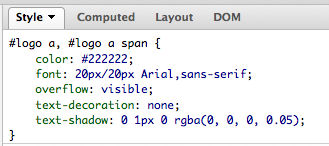
Next my CSS after I changed it in firebug on the fly

Now my logo with styling changed

I can then very easily copy and paste my changes I made in firebug into an external CSS file that will be used to overwrite the standard CSS permanently.
I also changed the styling of my employee report and the region title by changing it on the fly then copying it into my file

Once I have created my file I can then either store it on my server or upload to APEX
To upload to to APEX you can navigate to shared components then Cascading Style Sheets and upload the file

By doing this I can then reference the file inside my page template underneath the standard CSS or alternatively on each page by adding to the header text in the page definition

Once I have then linked the file my changes are then included on the page

One thing to be aware of is if you include the CSS in the page template then it will be modified on every page.
Thursday 1 March 2012
Easy Email Example
This ones a very quick post about a regular expression I use all the time to validate email addresses within my applications.
A while a go now I had the need to do this and I believe got the regular expression from http://regexlib.com and added into my application.
The regular expression which hasn’t failed me as yet is:
^((\s*[a-zA-Z0-9\._%-]+@[a-zA-Z0-9\.-]+\.[a-zA-Z]{2,4}\s*[,;:]){1,100}?)?(\s*[a-zA-Z0-9\._%-]+@[a-zA-Z0-9\.-]+\.[a-zA-Z]{2,4})*$
This should let all valid emails through and find all emails which aren’t valid.
This is how it should look when implemented. Obviously the item its linked to will very depending on the name of your item.

Saturday 25 February 2012
Dynamic Action Hide and Show Example
Recently I have seen a few people posting on the forum asking how you can hide and show items in APEX 4 and above, because of this I thought I would do a quick example.
The example is based on a simple registration form where a user can either choose to complete a private registration or register with company details.
I didn’t require the company information from the user if they was registering privately so I wanted to hide these fields.
So this is what I did, the first thing was to create my page items:

Page 102 is where I created my items and is where they will appear. The item that determines if they are hidden or shown is the P102_REGISTRATION_TYPE which is a select list item and has the following static values: STATIC2:Private;PRIVATE,Company;COMPANY
The next step is to create a dynamic action that will hide and show the various items.
First we have to say when it will fire

This states that when the P102_REGISTRATION_TYPE item which is the select list is changed and has a value of COMPANY then we want to the true actions to fire if not then the false actions should fire
The true and false actions can be seen below


So in the true actions I wanted to show the company items but hide the address item as I don’t need both a company and personal address.
In the false action I needed the address but nothing else
I have also checked the box when creating them that states that I want it to fire on page load.
This is a very simple way to hide and show items in a page dynamically without the page needing to be reloaded each time the select list is changed.
Previously jQuery was used to perform such actions but with the inclusion of dynamic actions in APEX 4 this became very simple using the approach above.
Subscribe to:
Posts (Atom)